Monday, 31 December 2018

Entity Framework Architecture

The following figure shows the overall architecture of the Entity Framework.
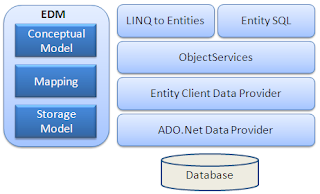
Let's look at the components of the architecture individually.
EDM (Entity Data Model): EDM consists of three main parts - Conceptual model, Mapping and Storage model.
Conceptual Model: The conceptual model contains the model classes and their relationships. This will be independent from your database table design.
Storage Model: The storage model is the database design model which includes tables, views, stored procedures, and their relationships and keys.
Mapping: Mapping consists of information about how the conceptual model is mapped to the storage model.
LINQ to Entities: LINQ-to-Entities (L2E) is a query language used to write queries against the object model. It returns entities, which are defined in the conceptual model. You can use your LINQ skills here.
Entity SQL: Entity SQL is another query language (For EF 6 only) just like LINQ to Entities. However, it is a little more difficult than L2E and the developer will have to learn it separately.
Object Service: Object service is a main entry point for accessing data from the database and returning it back. Object service is responsible for materialization, which is the process of converting data returned from an entity client data provider (next layer) to an entity object structure.
Entity Client Data Provider: The main responsibility of this layer is to convert LINQ-to-Entities or Entity SQL queries into a SQL query which is understood by the underlying database. It communicates with the ADO.Net data provider which in turn sends or retrieves data from the database.
ADO.Net Data Provider: This layer communicates with the database using standard ADO.Net.

How Entity Framework Works?

Here, you will see an overview of how entity framework works.
Entity Framework API (EF6 & EF Core) includes the ability to map domain (entity) classes to the database schema, translate & execute LINQ queries to SQL, track changes occurred on entities during their lifetime, and save changes to the database.

Entity Data Model

The very first task of EF API is to build an Entity Data Model (EDM). EDM is an in-memory representation of the entire metadata: conceptual model, storage model, and mapping between them.
Conceptual Model: EF builds the conceptual model from your domain classes, context class, default conventions followed in your domain classes, and configurations.
Storage Model: EF builds the storage model for the underlying database schema. In the code-first approach, this will be inferred from the conceptual model. In the database-first approach, this will be inferred from the targeted database.
Mappings: EF includes mapping information on how the conceptual model maps to the database schema (storage model).
EF performs CRUD operations using this EDM. It uses EDM in building SQL queries from LINQ queries, building INSERT, UPDATE, and DELETE commands, and transform database result into entity objects.

Querying

EF API translates LINQ-to-Entities queries to SQL queries for relational databases using EDM and also converts results back to entity objects.

Saving

EF API infers INSERT, UPDATE, and DELETE commands based on the state of entities when the SaveChanges() method is called. The ChangeTrack keeps track of the states of each entity as and when an action is performed.


Basic Workflow in Entity Framework

Here you will learn about the basic CRUD workflow using Entity Framework.
The following figure illustrates the basic workflow.
Let’s understand the above EF workflow:
  1. First of all, you need to define your model. Defining the model includes defining your domain classes, context class derived from DbContext, and configurations (if any). EF will perform CRUD operations based on your model.
  2. To insert data, add a domain object to a context and call the SaveChanges() method. EF API will build an appropriate INSERT command and execute it to the database.
  3. To read data, execute the LINQ-to-Entities query in your preferred language (C#/VB.NET). EF API will convert this query into SQL query for the underlying relational database and execute it. The result will be transformed into domain (entity) objects and displayed on the UI.
  4. To edit or delete data, update or remove entity objects from a context and call the SaveChanges() method. EF API will build the appropriate UPDATE or DELETE command and execute it to the database.
Let’s see how EF works in the next chapter.

What is Entity Framework?

Prior to .NET 3.5, we (developers) often used to write ADO.NET code or Enterprise Data Access Block to save or retrieve application data from the underlying database. We used to open a connection to the database, create a DataSet to fetch or submit the data to the database, convert data from the DataSet to .NET objects or vice-versa to apply business rules. This was a cumbersome and error prone process. Microsoft has provided a framework called "Entity Framework" to automate all these database related activities for your application.


Entity Framework is an open-source ORM framework for .NET applications supported by Microsoft. It enables developers to work with data using objects of domain specific classes without focusing on the underlying database tables and columns where this data is stored. With the Entity Framework, developers can work at a higher level of abstraction when they deal with data, and can create and maintain data-oriented applications with less code compared with traditional applications.
Official Definition: “Entity Framework is an object-relational mapper (O/RM) that enables .NET developers to work with a database using .NET objects. It eliminates the need for most of the data-access code that developers usually need to write.”
The following figure illustrates where the Entity Framework fits into your application.
As per the above figure, Entity Framework fits between the business entities (domain classes) and the database. It saves data stored in the properties of business entities and also retrieves data from the database and converts it to business entities objects automatically.

Entity Framework Features

  • Cross-platform: EF Core is a cross-platform framework which can run on Windows, Linux and Mac.
  • Modelling: EF (Entity Framework) creates an EDM (Entity Data Model) based on POCO (Plain Old CLR Object) entities with get/set properties of different data types. It uses this model when querying or saving entity data to the underlying database.
  • Querying: EF allows us to use LINQ queries (C#/VB.NET) to retrieve data from the underlying database. The database provider will translate this LINQ queries to the database-specific query language (e.g. SQL for a relational database). EF also allows us to execute raw SQL queries directly to the database.
  • Change Tracking: EF keeps track of changes occurred to instances of your entities (Property values) which need to be submitted to the database.
  • Saving: EF executes INSERT, UPDATE, and DELETE commands to the database based on the changes occurred to your entities when you call the SaveChanges()method. EF also provides the asynchronous SaveChangesAsync() method.
  • Concurrency: EF uses Optimistic Concurrency by default to protect overwriting changes made by another user since data was fetched from the database.
  • Transactions: EF performs automatic transaction management while querying or saving data. It also provides options to customize transaction management.
  • Caching: EF includes first level of caching out of the box. So, repeated querying will return data from the cache instead of hitting the database.
  • Built-in Conventions: EF follows conventions over the configuration programming pattern, and includes a set of default rules which automatically configure the EF model.
  • Configurations: EF allows us to configure the EF model by using data annotation attributes or Fluent API to override default conventions.
  • Migrations: EF provides a set of migration commands that can be executed on the NuGet Package Manager Console or the Command Line Interface to create or manage underlying database Schema.

Entity Framework Latest Versions

Microsoft introduced Entity Framework in 2008 with .NET Framework 3.5. Since then, it released many versions of Entity Framework. Currently, there are two latest versions of Entity Framework: EF 6 and EF Core. The following table lists important difference between EF 6 and EF Core.

EF 6 Version History

EF VersionRelease Year.NET Framework
EF 62013.NET 4.0 & .NET 4.5, VS 2012
EF 52012.NET 4.0, VS 2012
EF 4.32011.NET 4.0, VS 2012
EF 4.02010.NET 4.0, VS 2010
EF 1.0 (or 3.5)2008.NET 3.5 SP1, VS 2008

EF Core Version History

EF Core VersionRelease Date.NET Framework
EF Core 2.0August 2017.NET Core 2.0, VS 2017
EF Core 1.1November 2016.NET Core 1.1
EF Core 1.0June 2016.NET Core 1.0
Learn about the basic workflow while working with Entity Framework in the next chapter.