Sunday, 5 April 2020

What Is Microservices – Introduction To Microservice Architecture

Why Microservices?

Now, before I tell you about microservices, let’s see the architecture that prevailed before microservices i.e. the Monolithic Architecture.
In layman terms, you can say that its similar to a big container wherein all the software components of an application are assembled together and tightly packaged.
Listed down are the challenges of Monolithic Architecture:
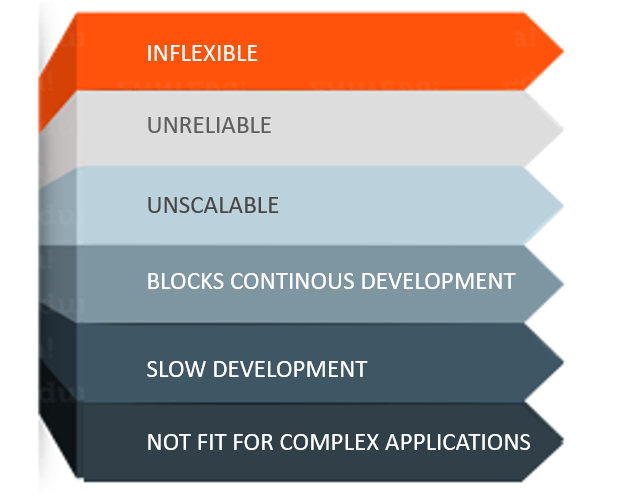
Figure 1: What Is Microservices – Challenges of Monolithic Architecture
    • Inflexible – Monolithic applications cannot be built using different technologies 
    • Unreliable – Even if one feature of the system does not work, then the entire system does not work
    • Unscalable – Applications cannot be scaled easily since each time the application needs to be updated, the complete system has to be rebuilt
    • Blocks Continous Development – Many features of the applications cannot be built and deployed at the same time
    • Slow Development – Development in monolithic applications take lot of time to be built since each and every feature has to be built one after the other
    • Not Fit For Complex Applications – Features of complex applications have tightly coupled dependencies
The above challenges were the main reasons that led to the evolution of microservices. 

What Is Microservices?

Microservices, aka Microservice Architecture, is an architectural style that structures an application as a collection of small autonomous services, modeled around a business domain.Microservices-What Is Microservices-Edureka
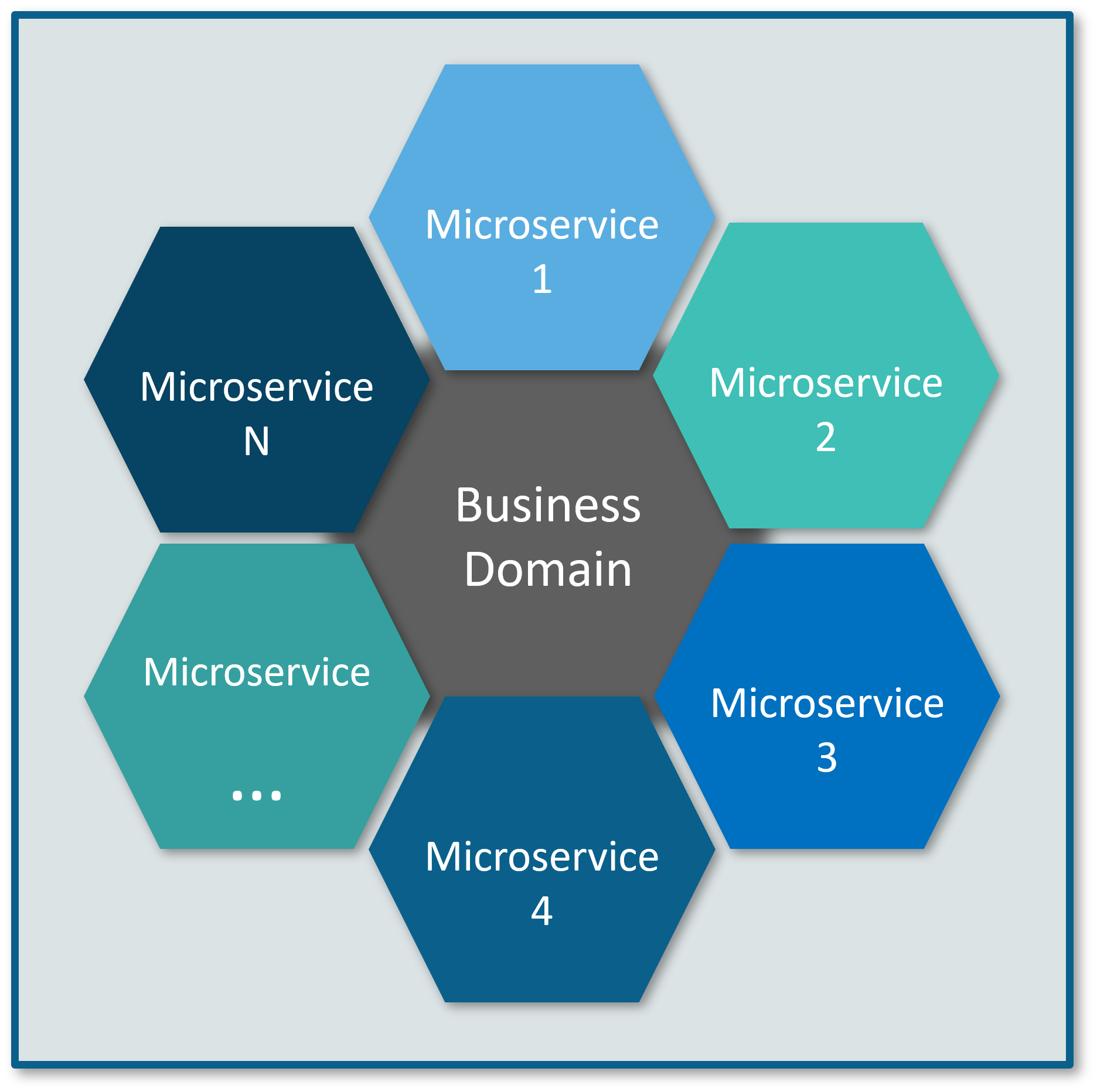
 Figure 2: What Is Microservices – Microservices Representation
In Microservice Architecture, each service is self-contained and implements a single business capability.

Differences Between Traditional Architecture and Microservices

Consider an E-commerce application as a use-case to understand the difference between both of them.Differences Between Monolithic Architecture And Microservices - What Is Microservices - Edureka
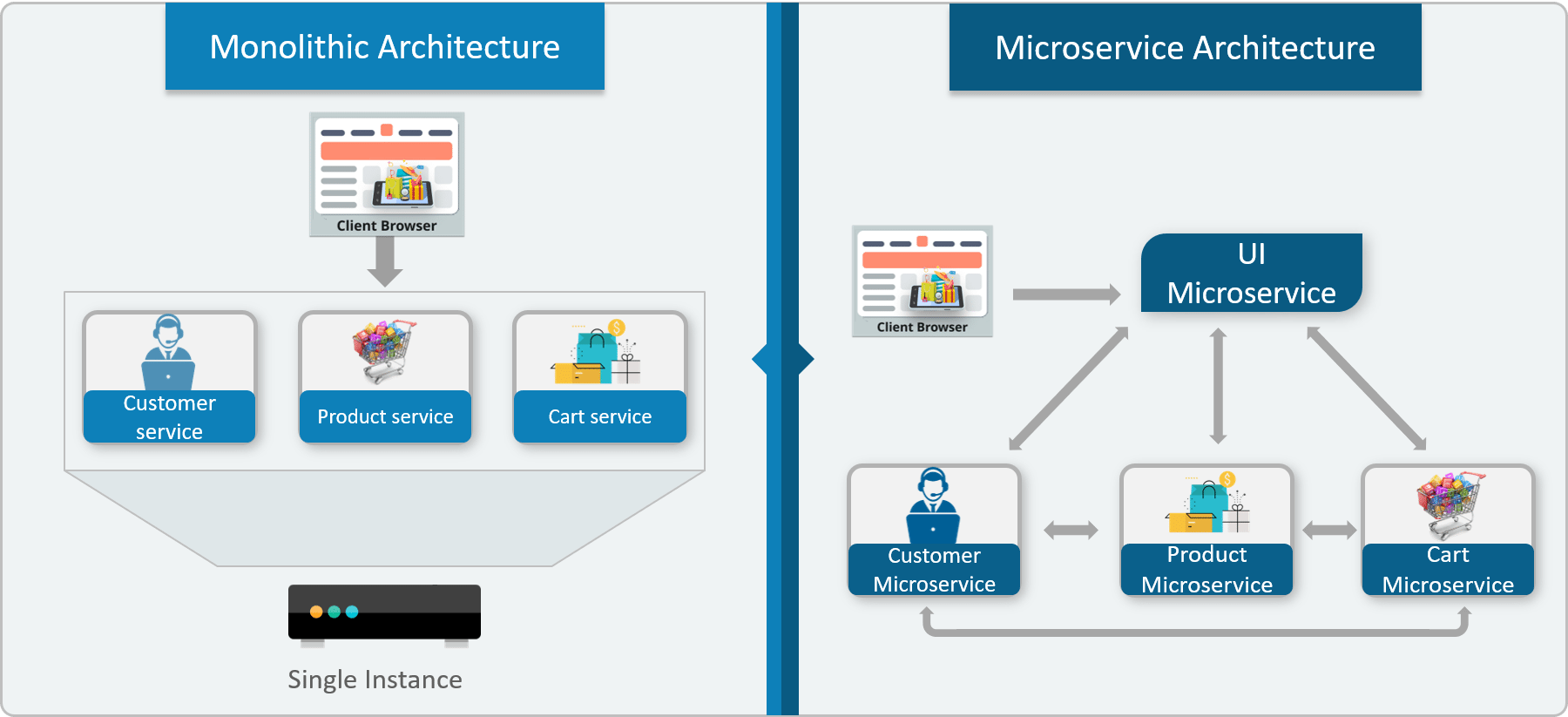
 Figure 3: What Is Microservices – Differences Between Monolithic Architecture and Microservices
The main difference we observe in the above diagram is that all the features initially were under a single instance sharing a single database. But then, with microservices, each feature was allotted a different microservice, handling their own data, and performing different functionalities. 
 Now, let us understand more about microservices by looking at its architecture. Refer the diagram below:

Microservice Architecture 
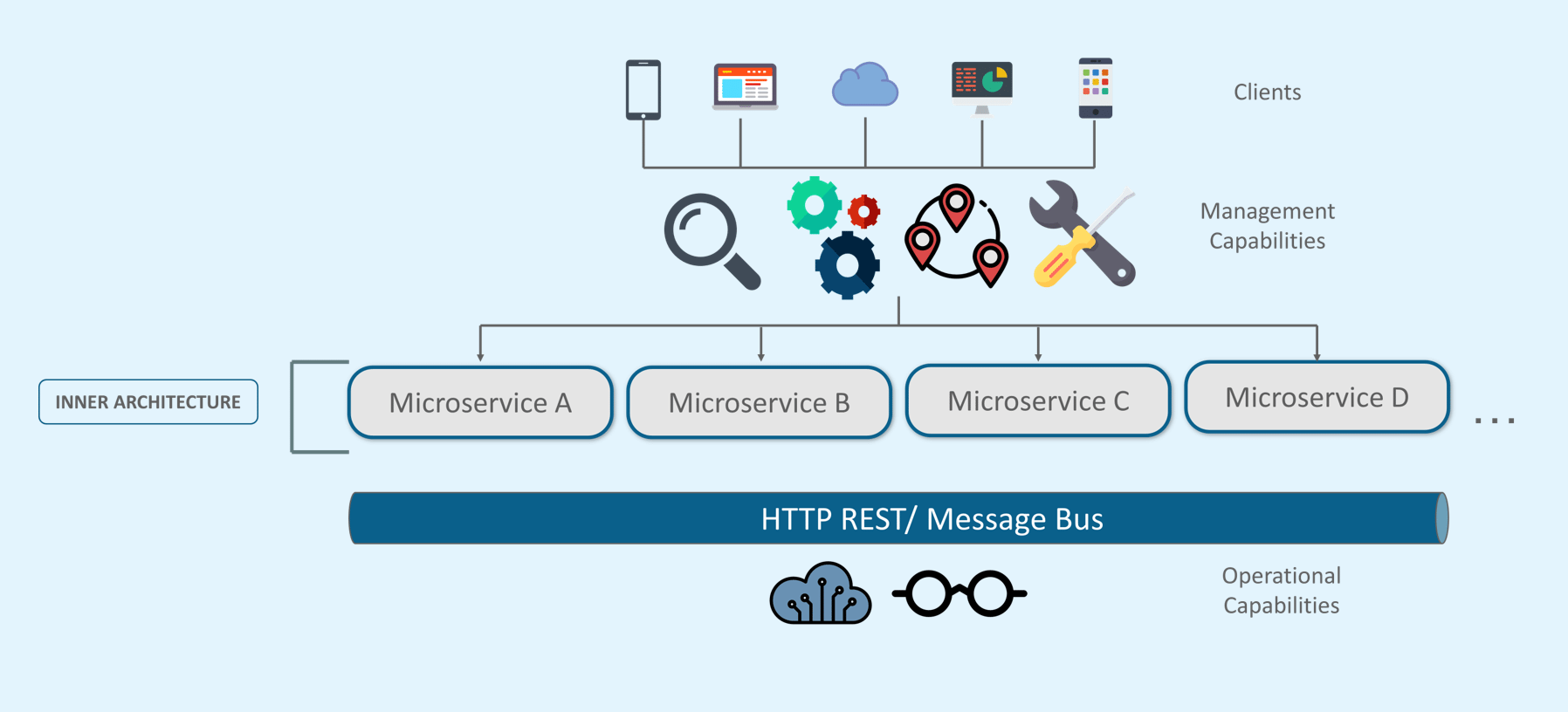
Microservice Architecture-What Is Microservices-Edureka
Figure 4: What Is Microservices – Microservice Architecture
  • Different clients from different devices try to use different services like search, build, configure and other management capabilities
  • All the services are separated based on their domains and functionalities and  are further allotted to individual microservices
  • These microservices have their own load balancer and execution environment to execute their functionalities & at the same time captures data in their own databases
  • All the microservices communicate with each other through a stateless server which is either REST or Message Bus
  • Microservices know their path of communication with the help of Service Discovery and perform operational capabilities such as automation, monitoring
  • Then all the functionalities performed by microservices are communicated to clients via API Gateway
  • All the internal points are connected from the API Gateway. So, anybody who connects to the API Gateway automatically gets connected to the complete system
Now, let us learn more about microservices by looking at its features.

Microservices Features
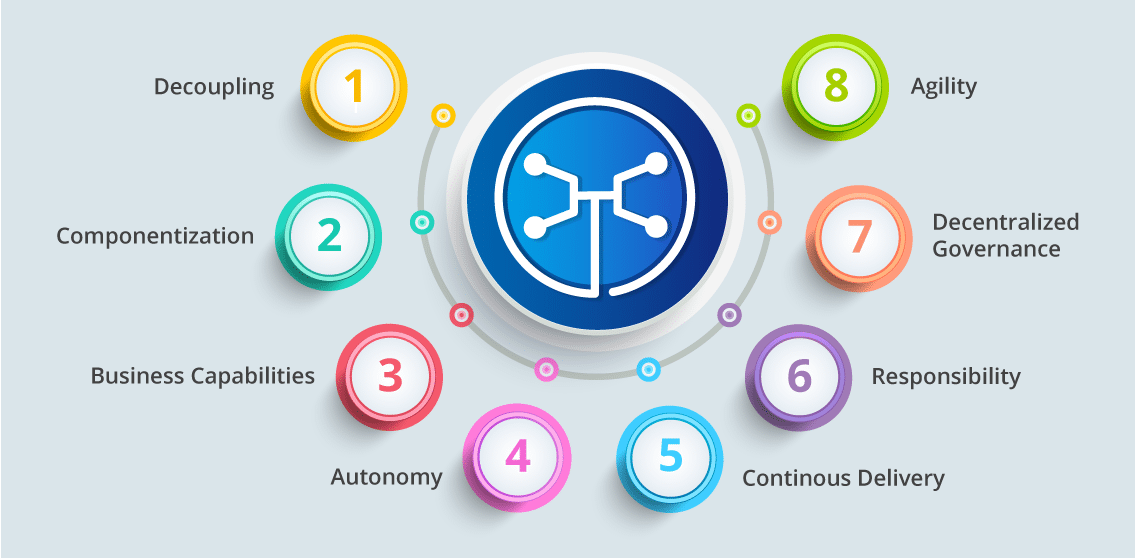
Microservices Features - What Is Microservices - Edureka
Figure 5: What Is Microservices – Features Of Microservices
  • Decoupling – Services within a system are largely decoupled. So the application as a whole can be easily built, altered, and scaled
  • Componentization – Microservices are treated as independent components that can be easily replaced and upgraded
  • Business Capabilities – Microservices are very simple and focus on a single capability 
  • Autonomy – Developers and teams can work independently of each other, thus increasing speed
  • Continous Delivery – Allows frequent releases of software, through systematic automation of software creation, testing, and approval 
  • Responsibility – Microservices do not focus on applications as projects. Instead, they treat applications as products for which they are responsible 
  • Decentralized Governance – The focus is on using the right tool for the right job. That means there is no standardized pattern or any technology pattern. Developers have the freedom to choose the best useful tools to solve their problems 
  • Agility – Microservices support agile development. Any new feature can be quickly developed and discarded again

Advantages Of Microservices
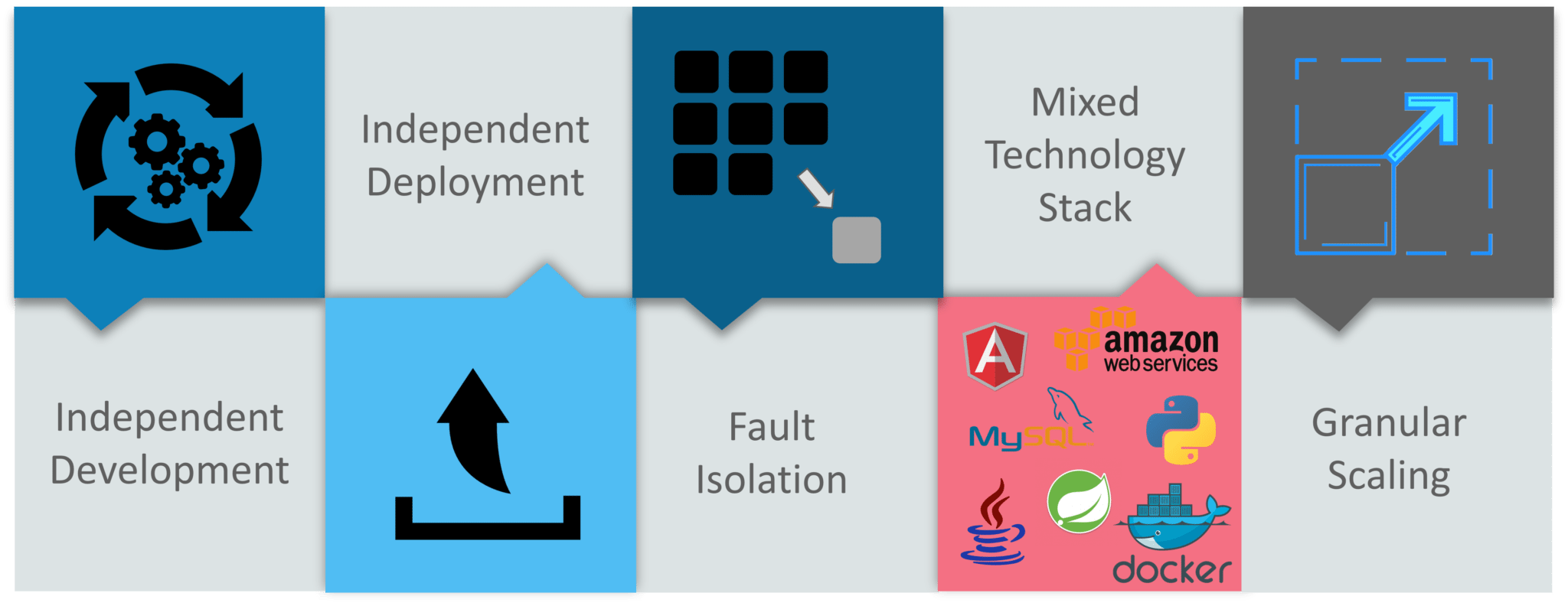
Advantages Of Microservices - What Is Microservices - Edureka
Figure 6: What Is Microservices – Advantages Of Microservices
  • Independent Development – All microservices can be easily developed based on their individual functionality
  • Independent Deployment – Based on their services, they can be individually deployed in any application 
  • Fault Isolation – Even if one service of the application does not work, the system still continues to function
  • Mixed Technology Stack – Different languages and technologies can be used to build different services of the same application
  • Granular Scaling –  Individual components can scale as per need, there is no need to scale all components together

Best Practices To Design Microservices

In today’s world, complexity has managed to creep into products. Microservice architecture promises to keep teams scaling and function better.
The following are the best practices to design microservices:Best practices to design microservices-What Are Microservices-edureka
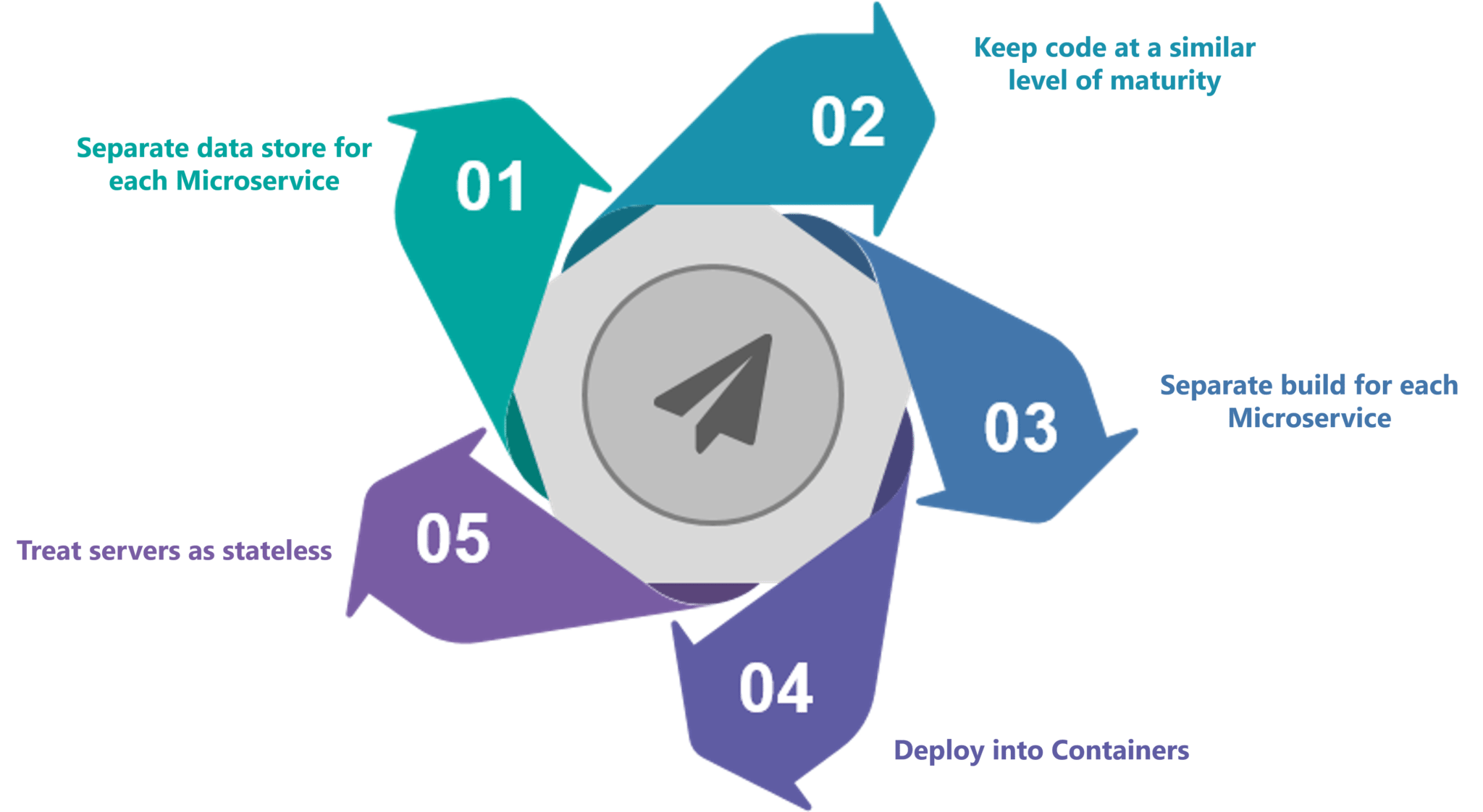
Figure 7: What Is Microservices – Best Practices To Design Microservices 
Now, let us look at a use-case to get a better understanding of microservices.

Use-Case: Shopping Cart Application

Let’s take a classic use case of a shopping cart application.
When you open a shopping cart application, all you see is just a website. But, behind the scenes, the shopping cart application has a service for accepting payments, a service for customer services and so on. 
Assume that developers of this application have created it in a monolithic framework.Refer to the diagram below:Monolithic Framework Usecase - What Is Microservices - Edureka
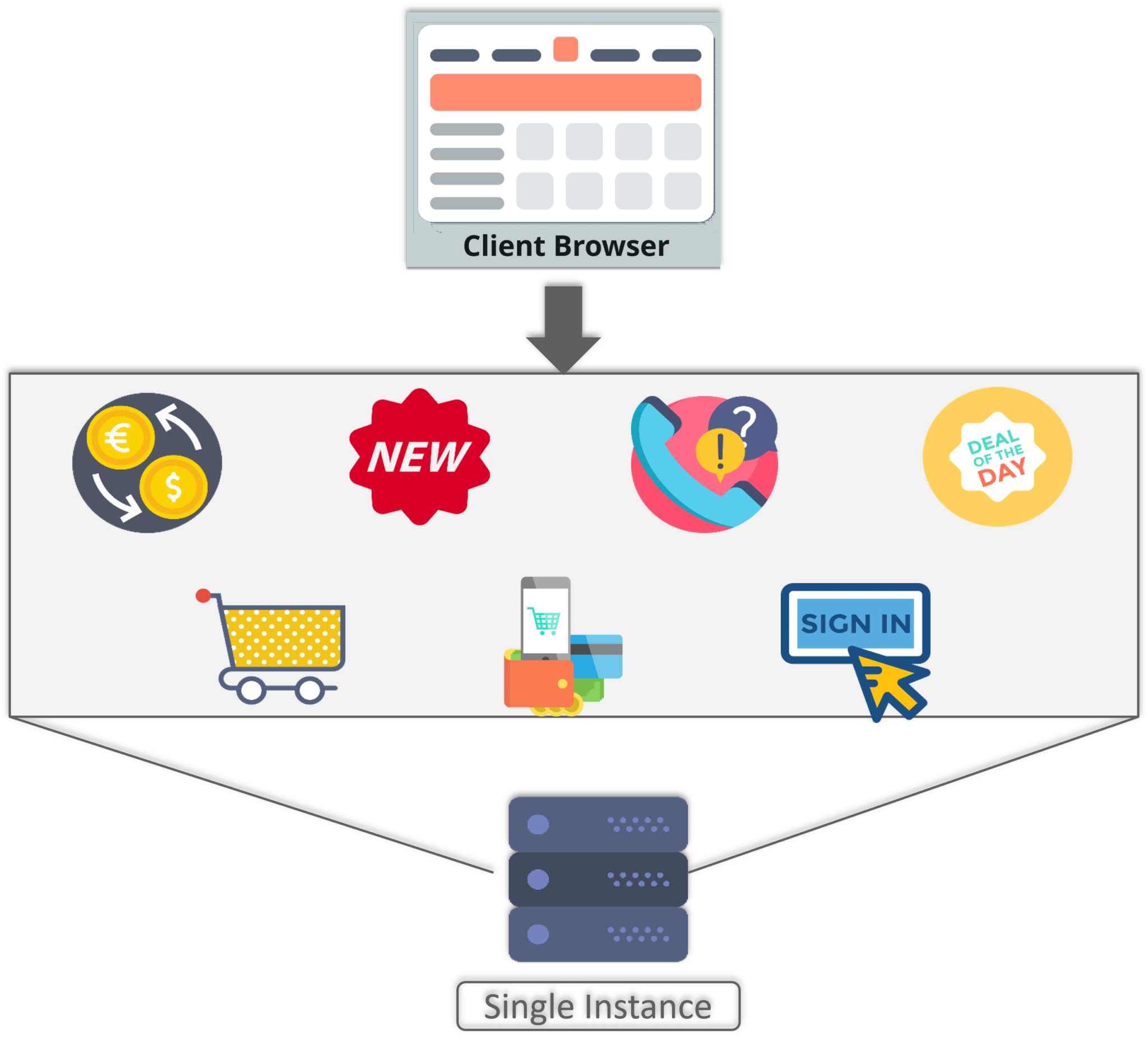
Figure 8: What Is Microservices – Monolithic Framework Of Shopping Cart Application
So, all the features are put together in a single code base and are under a single underlying database.
Now, let’s suppose that there is a new brand coming up in the market and developers want to put all the details of the upcoming brand in this application.
Then, they not only have to rework on the service for new labels, but they also have to reframe the complete system and deploy it accordingly.
To avoid such challenges developers of this application decided to shift their application from a monolithic architecture to microservices.Refer to the diagram below to understand the microservices architecture of shopping cart application
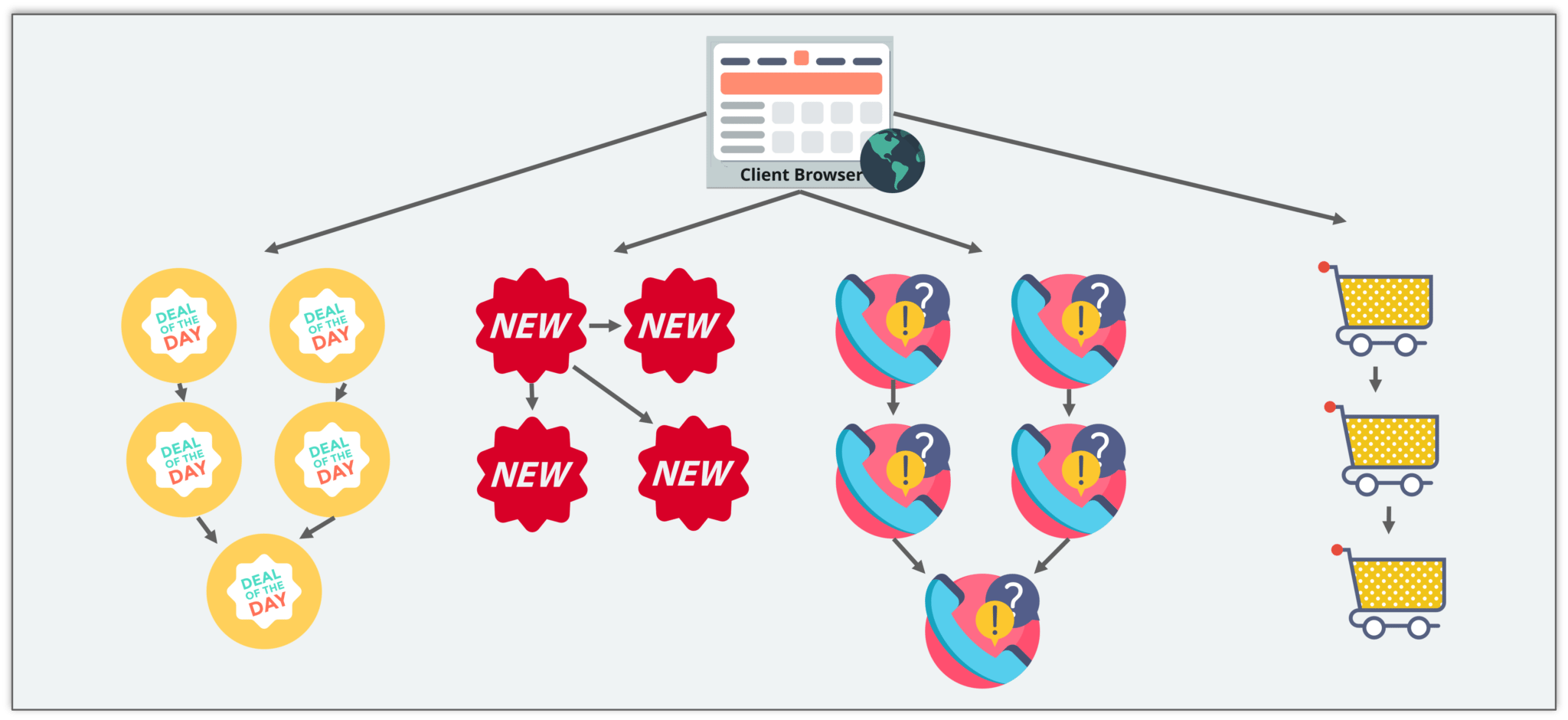
Microservices Framework Usecase - What Is Microservices - Edureka
Figure 9: What Is Microservices – Microservice Architecture Of Shopping Cart Application
This means that developers don’t create a web microservice, a logic microservice, or a database microservice. Instead, they create separate microservices for search, recommendations, customer services and so on.
This type of architecture for the application not only helps the developers to overcome all the challenges faced with the previous architecture but also helps the shopping cart application to be built, deployed, and scale up easily.

Companies using Microservices

There is a long list of companies using Microservices to build applications, these are just to name a few: 

Companies Using Microservices - What Is Microservices - Edureka


Notable Changes in Angular 9

1) Ivy applications: Previously, in applications, Hammer providers were included by default. With this commit, apps that want Hammer support must import HammerModule in their root module i.e.
 import {HAMMER_PROVIDERS} from './dom/events/hammer_gestures' 
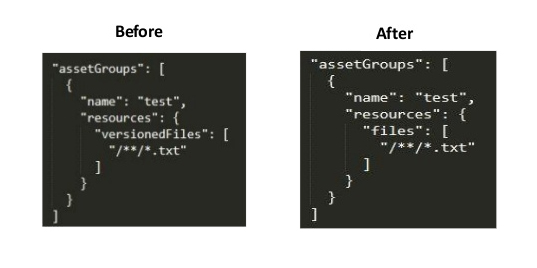
2) ServiceWorker: Remove deprecated option versionedFiles from service worker asset group configuration in ngsw-config.json
Updated service worker
3) Performance Improvements:
  • Ivy: don’t store public input names in two places.
  • Ivy: fix creation time micro-benchmarks.
  • Ivy: Improve performance of transplanted views.
  • Ivy: avoid native node retrieval from LView.
  • Ivy: avoid repeated native node retrieval and patching.
  • Ivy:avoid repeated tNode.initialInputs reads.
  • Ivy:move local references into consts array.
  • IvyR3TestBed – Do not process NgModuleDefs that have already been processed.

Bug Fixes

1) Common: update $locationShim to notify onChange listeners before emitting AngularJS events.
2) Compiler: return enableIvy true when using readConfiguration.
3) Ivy:
  • Get name directly from nativeNode.
  • Handle empty bindings in template type checker.
  • In ngcc, handle inline exports in commonjs code.
  • The ngcc should only index .d.ts exports within the package.
  • The ngTemplateOutlet error when switching between null and template value.
4) language-service:
  • Instantiate MetadataResolver once.
  • Remove "context" used for module resolution. 
5) Ngcc:
  • Handle deep imports that already have an extension.
  • Ignore format properties that exit but are undefined.

Angular 9 Features

  • Smaller bundles and better performance.
  • Added undecorated classes migration schematic in the core.
  • Support for TypeScript Diagnostics Format.
  • The formControlName also accepts a number in the form.
  • Internationalization support for Angular Ivy.
  • Selector-less directives as base classes in View Engine in the compiler.
  • Added support for selector-less directive as base classes in Ivy.
  • Ivy compiler is now the default for ngc.
  • Convert all ngtsc diagnostics to ts.Diagnostics.
  • Bazel: support ts_library targets as entry-points for ng_package.
  • Core: add dynamic queries schematic.
  • Core: Mark TestBed.get as deprecated.
  • Ivy: expose window.ng.getDebugNode helper and also support ng-add in localize package.
  • Ivy: i18n —add syntax support for $localize metadata block.
  • Ivy: i18n — reorganize entry-points for better reuse.
  • Language-service: enable logging on TypeScriptHost.
  • Language-service: provide diagnostic for invalid templateUrls.
  • Language-service: provide diagnostics for invalid styleUrls.

Saturday, 22 February 2020

How to add ngx-bootstrap In Angular 7

Introduction

In this article, we will learn how to add Bootstrap 4 and ngx-bootstrap in an Angular 7 (Beta) application. It is an easy way to integrate Bootstrap 3 or Bootstrap 4 Components with Angular using ngx-bootstrap. It contains all the core Bootstrap components powered by Angular. It is used to create an Angular-specific version of the Twitter Bootstrap components. The project is run by Valor Software. There is no need to include the original JS components. Merits of Angular 7 as shown below,
  • It supports the MVC concept.
  • It always supports SPA applications.
  • It supports unit testing very easily.
  • It is open source.
Prerequisite
  • Node
  • Npm
  • Angular CLI
  • TypeScript
  • Visual Studio code

Set up for Angular 7

  • Install the latest version of Node.js
  • Install Visual Studio Code
Description
Angular is an open source project which can be freely used, modified, and shared by others. Angular is developed by Google. Angular is a TypeScript based front-end web application platform. Before going through this session, please visit my previous sessions related to the Angular 7 application.
  • Introduction To Angular 7 Using Bootstrap 4
  • Set Up ⚙️ Angular 7 Beta On Windows, Linux, And Mac 💻
Steps to be followed,
Step 1
Open the VS Code terminal and write the below command to install ngx-bootstrap.
npm install ngx-bootstrap bootstrap --save
Now, in my machine, the latest Bootstrap version (bootstrap v4.2.1) and ngx-bootstrap (ngx-bootstrap v3.2.0) are installed successfully.
Step 2
Let's add our ngx-bootstrap components and that will be added to the root module. We first import the specific module for a specific component and then declare in the @NgModule.
Alert Component 
Now, let's add our first alerts component to our app. Open src/app/app.module.ts and add the below line of code.
  1. import { AlertModule} from 'ngx-bootstrap';  
  2.    
  3. @NgModule({  
  4. ...  
  5. imports: [AlertModule.forRoot(), ... ],  
  6. ...  
  7. })  
Finally, we have to declare the Bootstrap CSS file in styles array of Angular.Json file. Open .angular-cli.json and add the below line of code,
  1. "styles": [  
  2.               "src/styles.scss",  
  3.               "node_modules/animate.css/animate.min.css",  
  4.               "node_modules/bootstrap/dist/css/bootstrap.min.css"  
  5.             ],  
Let's set the alert in our component. Open src/app/app.component.html and add the below line of code to show alert functionality.
  1. <alert type="success">Welcome To ngx-bootstrap</alert>  
OUTPUT 
 
Buttons Component
Now, let's add our buttons component to our app. Open src/app/app.module.ts and add the below lines of code.
  1. import { ButtonsModule} from 'ngx-bootstrap';    
  2. @NgModule({    
  3.   imports: [ButtonsModule.forRoot(),...]    
  4. })     
Let's set the buttons in our component. Open src/app/app.component.html and add below code to show the button functionality. 
  1. <button type="button" class="btn btn-primary">  
  2.     Single Button Using ngx-bootstrap  
  3.   </button>  
OUTPUT
Tabs Component
Now, let's add our tabs component to our app. Open src/app/app.module.ts and add the below lines of code.
  1. import {TabsModule } from 'ngx-bootstrap';    
  2. @NgModule({    
  3.   imports: [TabsModule.forRoot(),...]    
  4. })     
Let's set the tabs in our component. Open src/app/app.component.html and add the below lines of code to show tabs functionality.
  1. <div>  
  2.     <tabset>  
  3.       <tab heading="Name" id="tab1">Satyaprakash Samantaray</tab>  
  4.       <tab heading="About">I am a Software Developer and MVP Winner</tab>  
  5.       <tab heading="Contact">satyatohome@gmail.com</tab>  
  6.       <tab heading="My Book">https://www.dotnettricks.com/mentors/satyaprakash-samantaray</tab>  
  7.     </tabset>  
  8.   </div>  
OUTPUT
 
Progressbar Component
Now, let's add our Progressbar component to our app. Open src/app/app.module.ts and add the below line of code.
  1. import {ProgressbarModule} from 'ngx-bootstrap';    
  2. @NgModule({    
  3.   imports: [ProgressbarModule.forRoot(),...]    
  4. })     
Let's set the Progressbar in our component. Open src/app/app.component.html and add the below line of code to show Progressbar functionality.
  1. <div class="row">  
  2.     <div class="col-sm-4">  
  3.       <div class="mb-2">  
  4.         <progressbar [value]="22" type="warning" [striped]="true">22%</progressbar>  
  5.       </div>  
  6.     </div>  
  7.     <div class="col-sm-4">  
  8.       <div class="mb-2">  
  9.         <progressbar max="200" [value]="166" type="danger" [striped]="true" [animate]="true"><i>166 / 200</i></progressbar>  
  10.       </div>  
  11.     </div>  
  12.   </div>  
OUTPUT
Note
After some modification happened in the Angular.json file, if the output isn't shown as expected after saving the changes, we have to recompile the application to make the change happens. So, let's run the below command.,
ng serve 
Let's create a row with 3 columns using Bootstrap 4.
  1. <div class="row text-center">  
  2.       <div class="col-4">  
  3.        Satya  
  4.       </div>  
  5.       <div class="col-4">  
  6.         Prakash  
  7.        </div>  
  8.        <div class="col-4">  
  9.         Kulu  
  10.        </div>  
  11.   </div>  
OUTPUT