Question #141
You are developing an application that uses a premium block blob storage account. You are optimizing costs by automating Azure Blob Storage access tiers.
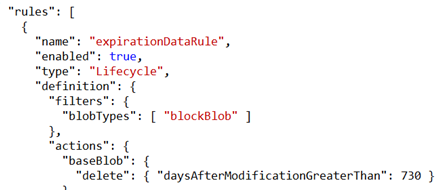
You apply the following policy rules to the storage account. You must determine the implications of applying the rules to the data. (Line numbers are included for reference only.)
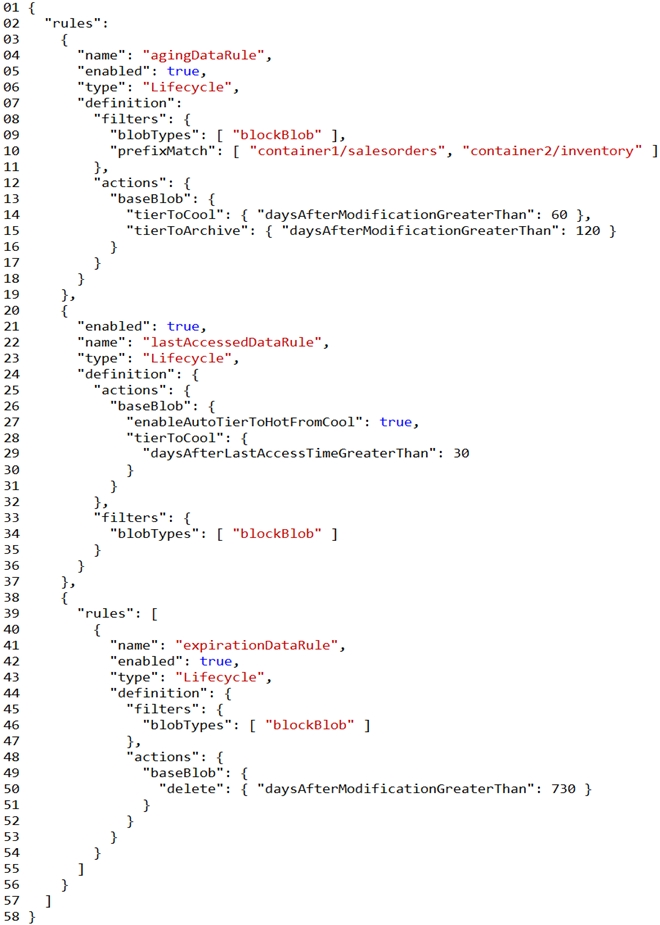
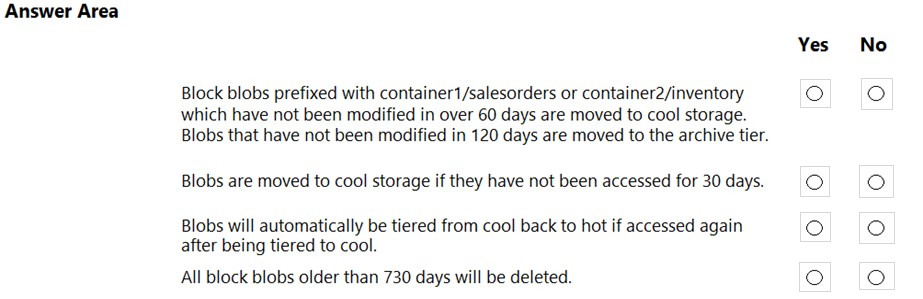
For each of the following statements, select Yes if the statement is true. Otherwise, select No.
NOTE: Each correct selection is worth one point.
Hot Area:
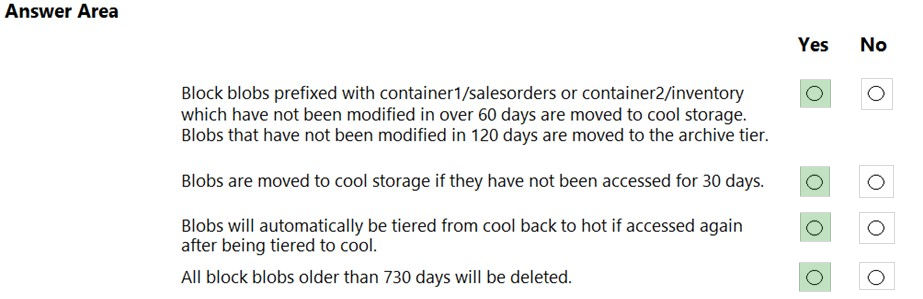
Box 1: Yes -
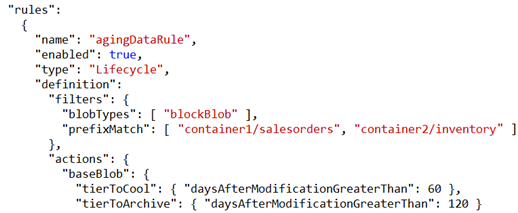
Box 2: Yes -
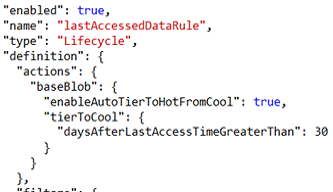
Box 3: Yes -
Box 4: Yes -
Question #142
The solution must meet the following requirements:
✑ Send insert and update operations to an Azure Blob storage account.
✑ Process changes to all partitions immediately.
✑ Allow parallelization of change processing.
You need to process the Azure Cosmos DB operations.
What are two possible ways to achieve this goal? Each correct answer presents a complete solution.
NOTE: Each correct selection is worth one point.
Correct Answer:
AC
Azure Functions is the simplest option if you are just getting started using the change feed. Due to its simplicity, it is also the recommended option for most change feed use cases. When you create an Azure Functions trigger for Azure Cosmos DB, you select the container to connect, and the Azure Function gets triggered whenever there is a change in the container. Because Azure Functions uses the change feed processor behind the scenes, it automatically parallelizes change processing across your container's partitions.
Note: You can work with change feed using the following options:
✑ Using change feed with Azure Functions
✑ Using change feed with change feed processor
Reference:
https://docs.microsoft.com/en-us/azure/cosmos-db/read-change-feed
Question #143
You have an Azure Web app that uses Cosmos DB as a data store. You create a CosmosDB container by running the following PowerShell script:
$resourceGroupName = "testResourceGroup"
$accountName = "testCosmosAccount"
$databaseName = "testDatabase"
$containerName = "testContainer"
$partitionKeyPath = "/EmployeeId"
$autoscaleMaxThroughput = 5000
New-AzCosmosDBSqlContainer -
-ResourceGroupName $resourceGroupName
-AccountName $accountName
-DatabaseName $databaseName
-Name $containerName
-PartitionKeyKind Hash
-PartitionKeyPath $partitionKeyPath
-AutoscaleMaxThroughput $autoscaleMaxThroughput
You create the following queries that target the container:
SELECT * FROM c WHERE c.EmployeeId > '12345'
SELECT * FROM c WHERE c.UserID = '12345'
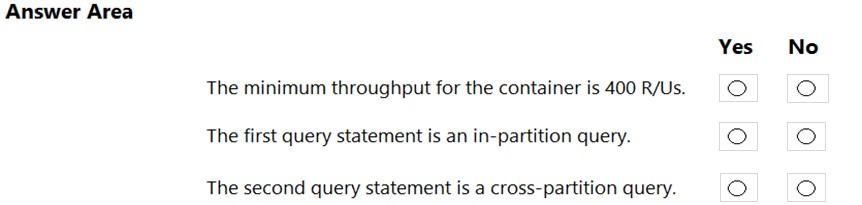
For each of the following statements, select Yes if the statement is true. Otherwise, select No.
NOTE: Each correct selection is worth one point.
Hot Area:
Correct Answer: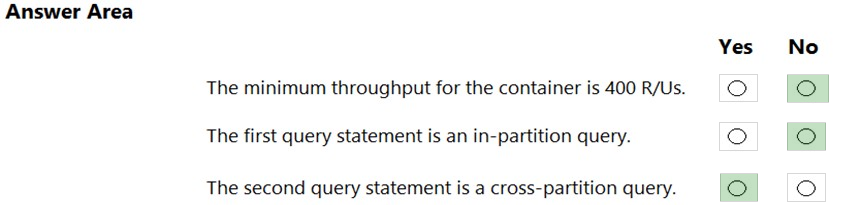
Box 1: No -
You set the highest, or maximum RU/s Tmax you don't want the system to exceed. The system automatically scales the throughput T such that 0.1* Tmax <= T <=
Tmax.
In this example we have autoscaleMaxThroughput = 5000, so the minimum throughput for the container is 500 R/Us.
Box 2: No -
First query: SELECT * FROM c WHERE c.EmployeeId > '12345'
Here's a query that has a range filter on the partition key and won't be scoped to a single physical partition. In order to be an in-partition query, the query must have an equality filter that includes the partition key:
SELECT * FROM c WHERE c.DeviceId > 'XMS-0001'
Box 3: Yes -
Example of In-partition query:
Consider the below query with an equality filter on DeviceId. If we run this query on a container partitioned on DeviceId, this query will filter to a single physical partition.
SELECT * FROM c WHERE c.DeviceId = 'XMS-0001'
Reference:
https://docs.microsoft.com/en-us/azure/cosmos-db/how-to-choose-offer https://docs.microsoft.com/en-us/azure/cosmos-db/how-to-query-container
Question #144
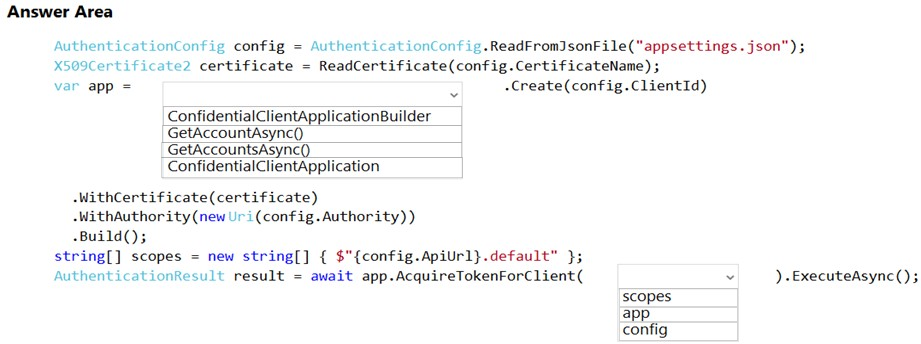
You are developing a web application that makes calls to the Microsoft Graph API. You register the application in the Azure portal and upload a valid X509 certificate.
You create an appsettings.json file containing the certificate name, client identifier for the application, and the tenant identifier of the Azure Active Directory (Azure
AD). You create a method named ReadCertificate to return the X509 certificate by name.
You need to implement code that acquires a token by using the certificate.
How should you complete the code segment? To answer, select the appropriate options in the answer area.
NOTE: Each correct selection is worth one point.
Hot Area:
Correct Answer: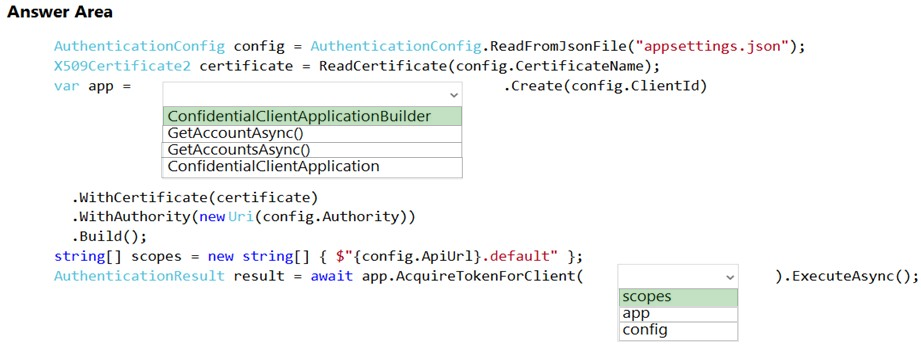
Box 1: ConfidentialClientApplicationBuilder
Here's the code to instantiate the confidential client application with a client secret: app = ConfidentialClientApplicationBuilder.Create(config.ClientId)
.WithClientSecret(config.ClientSecret)
.WithAuthority(new Uri(config.Authority))
.Build();
Box 2: scopes -
After you've constructed a confidential client application, you can acquire a token for the app by calling AcquireTokenForClient, passing the scope, and optionally forcing a refresh of the token.
Sample code: result = await app.AcquireTokenForClient(scopes)
.ExecuteAsync();
Reference:
https://docs.microsoft.com/en-us/azure/active-directory/develop/scenario-daemon-app-configuration https://docs.microsoft.com/en-us/azure/active-directory/develop/scenario-daemon-acquire-token
Question #145
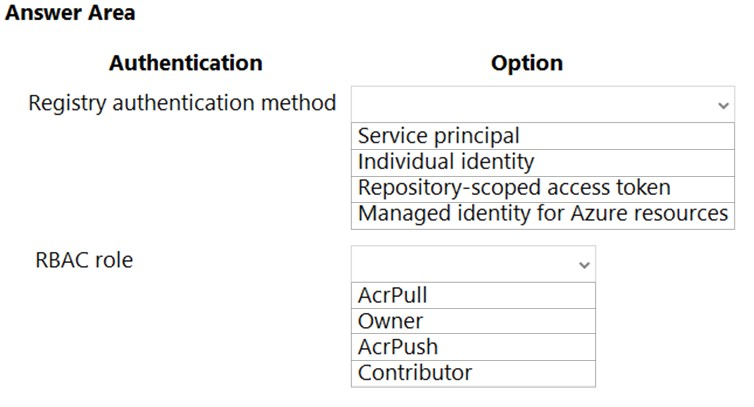
You develop a containerized application. You plan to deploy the application to a new Azure Container instance by using a third-party continuous integration and continuous delivery (CI/CD) utility.
The deployment must be unattended and include all application assets. The third-party utility must only be able to push and pull images from the registry. The authentication must be managed by Azure Active Directory (Azure AD). The solution must use the principle of least privilege.
You need to ensure that the third-party utility can access the registry.
Which authentication options should you use? To answer, select the appropriate options in the answer area.
NOTE: Each correct selection is worth one point.
Hot Area:
Correct Answer: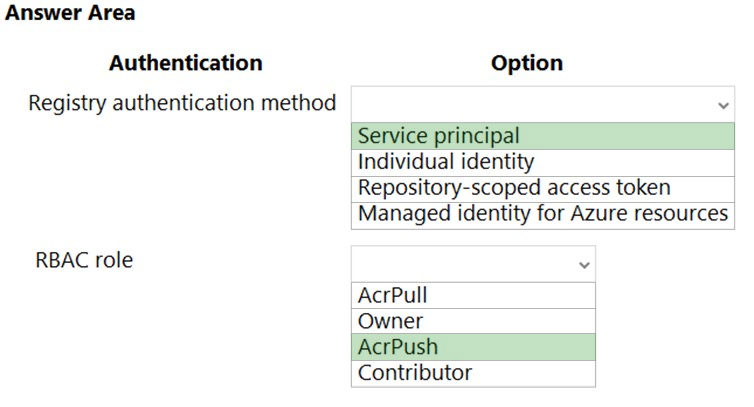
Box 1: Service principal -
Applications and container orchestrators can perform unattended, or "headless," authentication by using an Azure Active Directory (Azure AD) service principal.
Incorrect Answers:
✑ Individual AD identity does not support unattended push/pull
✑ Repository-scoped access token is not integrated with AD identity
✑ Managed identity for Azure resources is used to authenticate to an Azure container registry from another Azure resource.
Box 2: AcrPush -
AcrPush provides pull/push permissions only and meets the principle of least privilege.
Incorrect Answers:
AcrPull only allows pull permissions it does not allow push permissions.
✑ Owner and Contributor allow pull/push permissions but does not meet the principle of least privilege.
Reference:
https://docs.microsoft.com/en-us/azure/container-registry/container-registry-authentication?tabs=azure-cli https://docs.microsoft.com/en-us/azure/container-registry/container-registry-roles?tabs=azure-cli
Question #146
The app must authenticate users and must use SSL for all communications. The app must use Twitter as the identity provider.
You need to validate the Azure AD request in the app code.
What should you validate?
Correct Answer:
A
Reference:
https://docs.microsoft.com/en-us/azure/storage/common/storage-auth-aad-app?tabs=dotnet
Question #147
-
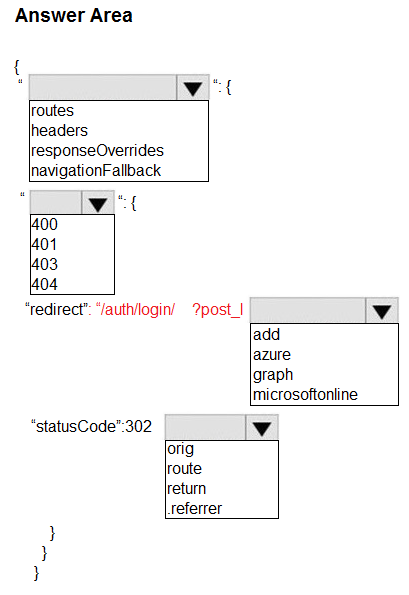
You are developing an Azure Static Web app that contains training materials for a tool company. Each tool’s training material is contained in a static web page that is linked from the tool’s publicly available description page.
A user must be authenticated using Azure AD prior to viewing training.
You need to ensure that the user can view training material pages after authentication.
How should you complete the configuration file? To answer, select the appropriate options in the answer area.
NOTE: Each correct selection is worth one point.
Correct Answer:
Question #148
-
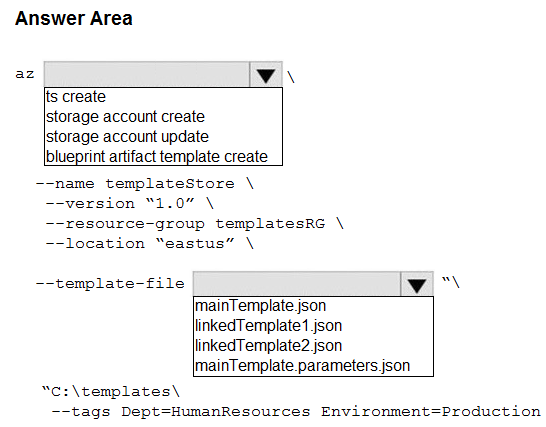
You are authoring a set of nested Azure Resource Manager templates to deploy Azure resources. You author an Azure Resource Manager template named mainTemplate.json that contains the following linked templates: linkedTemplate1.json, linkedTemplate2.json.
You add parameters to a parameters template file named mainTemplate.parameters,json. You save all templates on a local device in the C:\templates\ folder.
You have the following requirements:
• Store the templates in Azure for later deployment.
• Enable versioning of the templates.
• Manage access to the templates by using Azure RBAC.
• Ensure that users have read-only access to the templates.
• Allow users to deploy the templates.
You need to store the templates in Azure.
How should you complete the command? To answer, select the appropriate options in the answer area.
NOTE: Each correct selection is worth one point.
Correct Answer: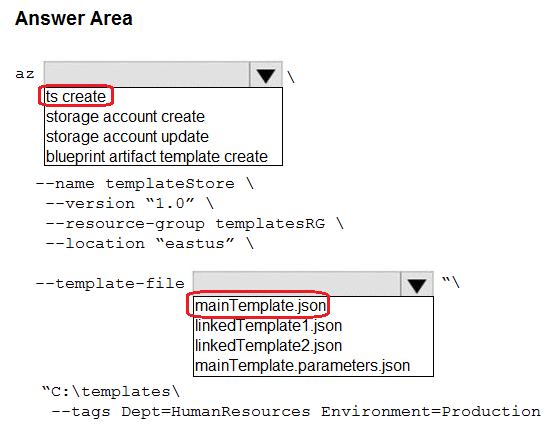
Question #149
-
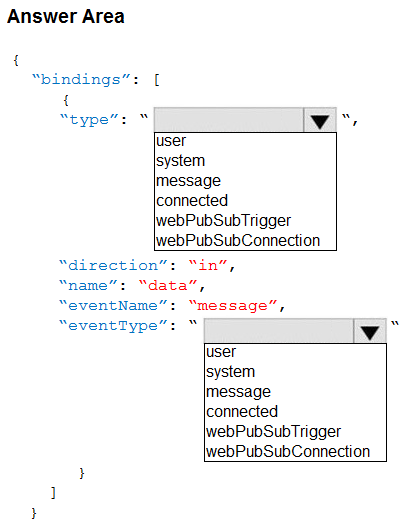
You are developing a service where customers can report news events from a browser using Azure Web PubSub. The service is implemented as an Azure Function App that uses the JSON WebSocket subprotocol to receive news events.
You need to implement the bindings for the Azure Function App.
How should you configure the binding? To answer, select the appropriate options in the answer area.
NOTE: Each correct selection is worth one point.
Correct Answer: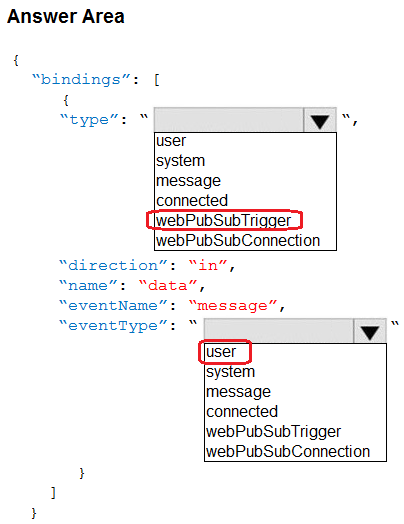
Question #150
-
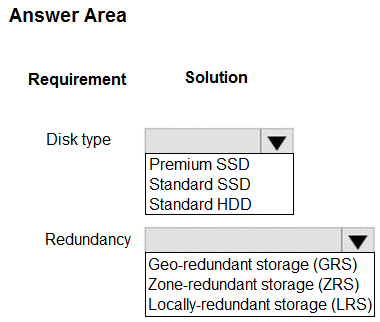
You are building a software-as-a-service (SaaS) application that analyzes DNA data that will run on Azure virtual machines (VMs) in an availability zone. The data is stored on managed disks attached to the VM. The performance of the analysis is determined by the speed of the disk attached to the VM.
You have the following requirements:
• The application must be able to quickly revert to the previous day’s data if a systemic error is detected.
• The application must minimize downtime in the case of an Azure datacenter outage.
You need to provision the managed disk for the VM to maximize performance while meeting the requirements.
Which type of Azure Managed Disk should you use? To answer, select the appropriate options in the answer area.
NOTE: Each correct selection is worth one point.
Correct Answer:
