Tuesday, 22 November 2022

Invalid Option ‘7.3’ For /langversion; Must Be ISO-1, ISO-2, Default

 This is one of the common errors we face in ASP.NET from time to time. This compiler error occurs sometimes because of version changes where the Dotnet compiler version and C# version are incompatible.

Exact Error

Compilation Error

Description: An error occurred during the compilation of a resource required to service this request. Please review the following specific error details and modify your source code appropriately.

Compiler Error Message: CS1617: Invalid option ‘6’ for /langversion; must be ISO-1, ISO-2, 3, 4, 5 or Default

In short, we will below error in the compiler.

Compiler Error Message - Invalid option ‘7.3’ for /langversion; must be ISO-1, ISO-2, Default, Latest, or a valid version in range 1 to 7.1.

Solution 1

One of the easy solutions is to install and reinstall these two NuGet packages.

  • Microsoft.CodeDom.Providers.DotNetCompilerPlatform
  • Microsoft.Net.Compilers

Right Click on Project >> Manage NuGet Packages >> Installed as shown,

Manage NuGet Packages

Simply, uninstall and install again these packages.

Solution 2. Another way is to update the following NuGet packages (whichever installed) to resolve the problem,

  • Microsoft.CodeDom.Providers.DotNetCompilerPlatform
  • Microsoft.Net.Compilers

Solution 3: Pay attention to compiler “type” in the Web.Config file, when changing Framework version,

for 4.5 and C#5,

type="Microsoft.CSharp.CSharpCodeProvider...

for 4.6 and C#6,

type="Microsoft.CodeDom.Providers.DotNetCompilerPlatform.CSharpCodeProvider, Microsoft.CodeDom.Providers.DotNetCompilerPlatfor

Workaround: Change in webconfig,

<system.codedom>
    <compilers>
      <compiler language="c#;cs;csharp" extension=".cs" type="Microsoft.CSharp.CSharpCodeProvider, System, Version=4.0.0.0, Culture=neutral, PublicKeyToken=b77a5c561934e089" warningLevel="4" compilerOptions="/langversion:6 /nowarn:1659;1699;1701">
          <providerOption name="CompilerVersion" value="v4.0"/>
      </compiler>
      <compiler language="vb;vbs;visualbasic;vbscript" extension=".vb" type="Microsoft.CodeDom.Providers.DotNetCompilerPlatform.VBCodeProvider, Microsoft.CodeDom.Providers.DotNetCompilerPlatform, Version=1.0.0.0, Culture=neutral, PublicKeyToken=31bf3856ad364e35" warningLevel="4" compilerOptions="/langversion:14 /nowarn:41008 /define:_MYTYPE=\&quot;Web\&quot; /optionInfer+"/>
    </compilers>
  </system.codedom>
C#

Attribute  “compilerOptions” needs to be replaced: “langversion:6” -> ‘langversion:5“

This is how we can solve this compilation error.

Azure Cosmos DB Consistency Levels - Strong, Bounded Staleness, Session, Consistent Prefix and Eventual

 Relational databases follow the ACID properties – Atomicity, Consistency, Isolation, and Durability to ensure data integrity when data is added, changed or removed. For example, if you deposit money in a bank account and its corresponding transaction is committed, the relational database must ensure that the new value (amount) is stored and consistent for all transactions. 

For Azure Cosmos DB, data can be written to multiple replicas spread geographically to multiple datacenters and therefore it is essential to understand the different consistency levels and how this impacts data reads and writes. Let’s explore the consistency levels in Azure Cosmos DB to allow you to make a good decision on which would work best for your data.

Solution

Azure Cosmos DB as a distributed database relies on replication for high availability, low latency, and throughput across replicas. The applications can fetch data from the nearest replica for low latency and high response time. Replicas are a copy stored in the Azure region for disaster recovery or geo-distribution, but there are some differences on how data is replicated.

Azure Cosmos DB consistency defines how data is committed to different replicas and data consistency for reads across replicas. Suppose you have configured Cosmos DB read/write requests in the US East region and users access records from different regions – Europe and Asia. If you want to read data in any configured region without data loss, you need to consider geographical distance for data distribution.

Default Consistency

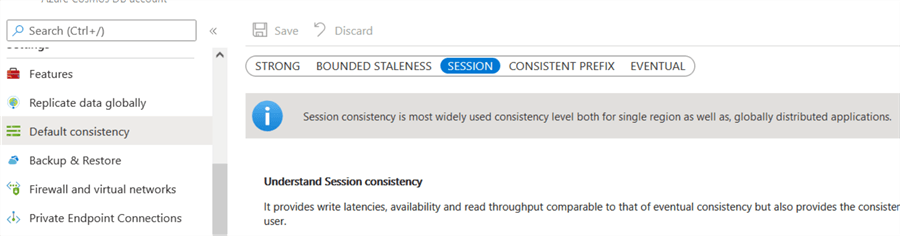
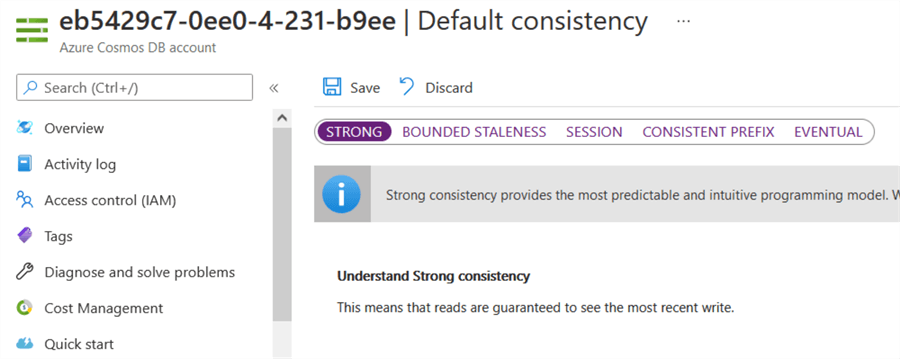
Click on the Default consistency option in the Azure Cosmos DB account and it shows the available consistency levels. Session consistency is the default consistency level.

Consistency Models in Azure Cosmos DB

Consistency Models in Azure Cosmos DB

Azure Cosmos DB has the following consistency levels:

  • Strong
  • Bounded Staleness
  • Session
  • Consistent Prefix
  • Eventual

The following image shows the consistency level related to high availability, lower latency, and higher throughput.
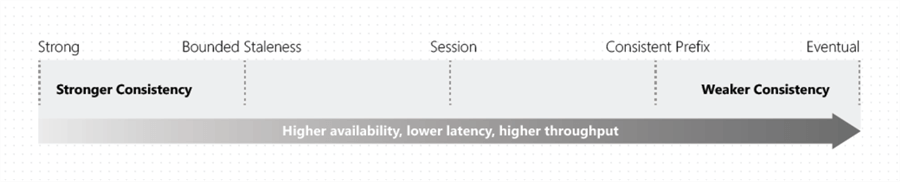
Consistency as a spectrum
source Microsoft

Let’s understand these consistency levels and the difference between them.

Strong Consistency

"Strong consistency is the most predictable and intuitive programming model and guarantees linearizability."

The strong consistency offers guaranteed reads to the most recent committed version of the item. The client will not get an uncommitted write or partial write from a replica.

The strong consistency is suitable for applications that cannot tolerate any data loss due to downtime. It requires every write to replicate across all regions, therefore it substantially increases latency. If the distance between replicas is vast, it will take more time to write data to another Azure region. It is the strictest type of consistency of Cosmos DB.

In summary, the strong consistency model has the following properties:

  • Highest Consistency
  • Lowest Performance
  • Lowest Availability

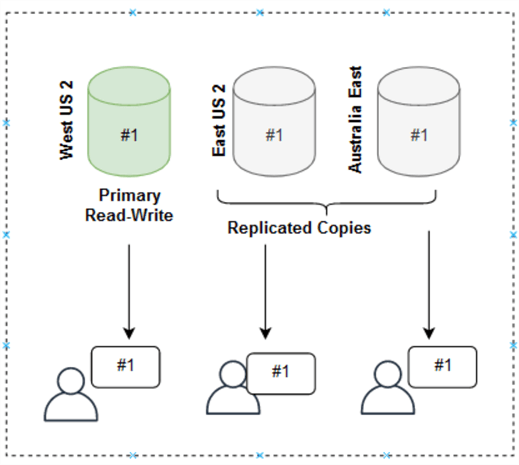
The following image illustrates data replicated to East US2 and Australia East and the users get the latest data (#1) in each region.

Strong Consistency

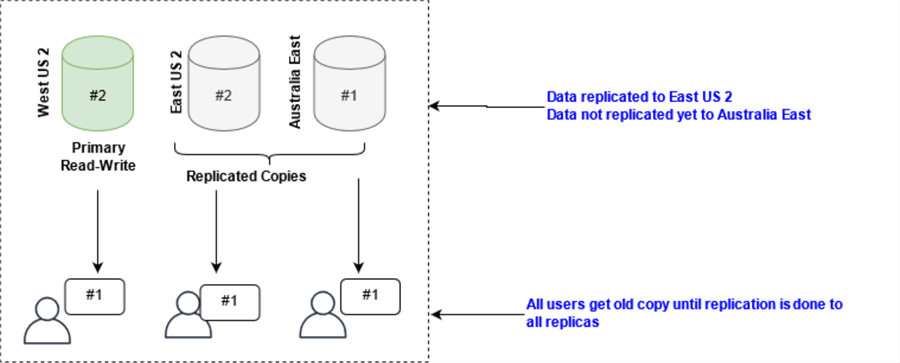
Suppose a user updates data (#2) in West US2. Data gets replicated to East US2, but it is not replicated yet to Australia East. In this case, all users read the old data (#1) until replication is completed to all replicas.

Strong Consistency

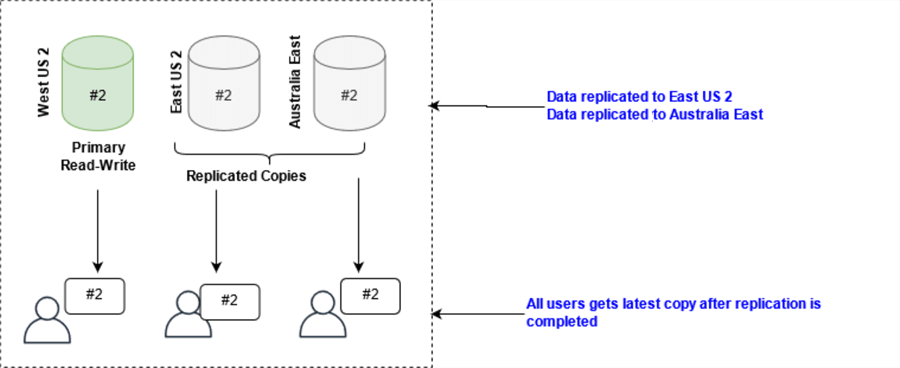
Once the data commits across all replicas, users see the newly committed data (#2) in all regions.

Strong Consistency

Bounded Staleness consistency

"Bounded Staleness consistency is used mainly by globally distributed applications that expect low write latencies with total global order guarantees."

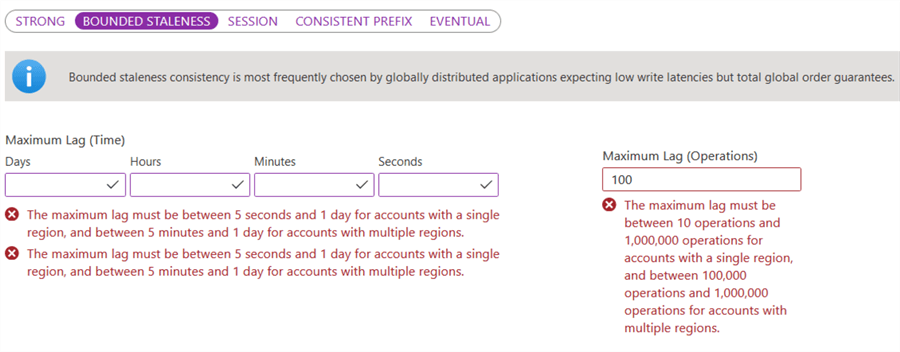
The Bounded Staleness consistency trades delays for strong consistency. We can specify maximum lag (time) or maximum lag (operations).

Bounded Staleness consistency

Maximum lag (time):

  • Single region: It must be between 5 seconds and 1 day for a single region account.
  • Multiple regions: It must be between 5 minutes and 1 day for accounts with multiple regions.

Maximum Lag (operations)

  • Single region: It must be between 10 and 1,000,000 operations for accounts with a single region.
  • Multiple regions: It must be between 100,000 and 1,000,000 for accounts with multiple regions.

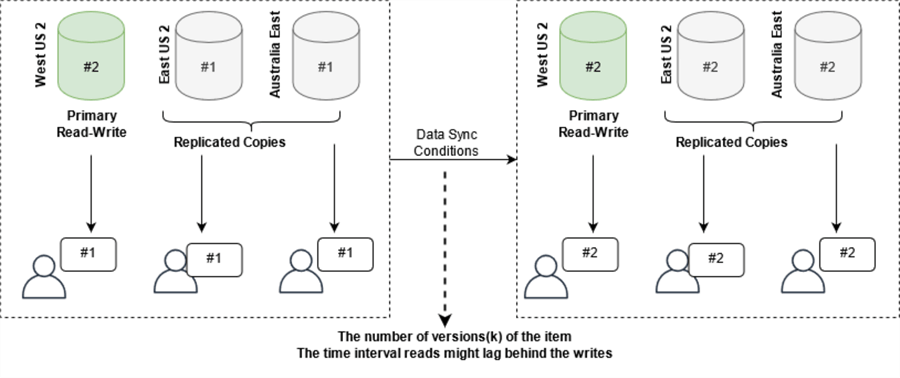
The following image shows a user updates data in West US 2. The data sync to the replicated regions East US 2 and Australia East happens after the configured maximum operations or maximum lag time. Until the replication is completed, all users will get old data (#1).

Bounded Staleness consistency

The Bounder Staleness consistency model is suitable for globally distributed applications requiring low write latencies with a total global order guarantee. For example, stock ticker, group collaboration, publish-subscribe, queuing, etc.

Session Consistency

"Session consistency is the widely used consistency level for single regions and globally distributed applications."

It provides good performance and availability.

The session consistency ensures the following in a single client session:

  • Consistent prefix
  • Monotonic reads and writes
  • Read your writes
  • Write follow reads guarantee

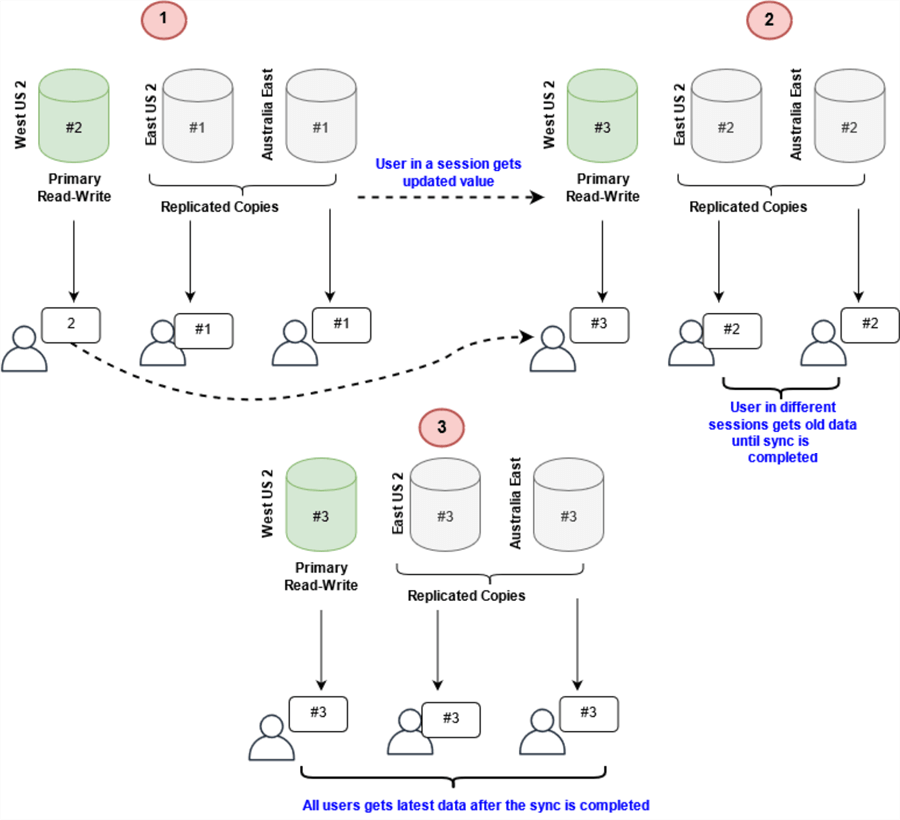
The following image reflects the session consistency as stated below:

  1. User updates record (#2) in West US2. All users except that specific session get old (#1) data until replication is completed.
  2. Similarly, if a user updates another record in West US2 record (#3), that user gets the latest record (#3) as shown in section 2 below. Users in East US 2 and Australia East still get old data (#2) until data sync is finished.
  3. After data sync, all users get the latest data (#3) as shown in section 3 below.

For example, with the writer in West US2, the reads in West US2 and East US2 region simultaneously read the same data in a single user session. At the same time, a user with a different client session reads data once data sync is completed, however it follows the same order of writes.

Session Consistency

The Session consistency is suitable for e-commerce applications, social media apps, and applications that require persistent user connections.

Note: It is the default consistency level for Azure Cosmos DB databases and collections.

Consistent Prefix

"Consistent prefix level guarantees that reads never see out-of-order writes."

The consistent prefix model is like the bounded staleness except without the operational or time lag guarantee. It guarantees the consistency and order of the writes. However, data is not always current. For example, if data is written in A, B, C order, the user may get A, B or A, B, C. It will not get out of order writes such as A, C or A, C, B.

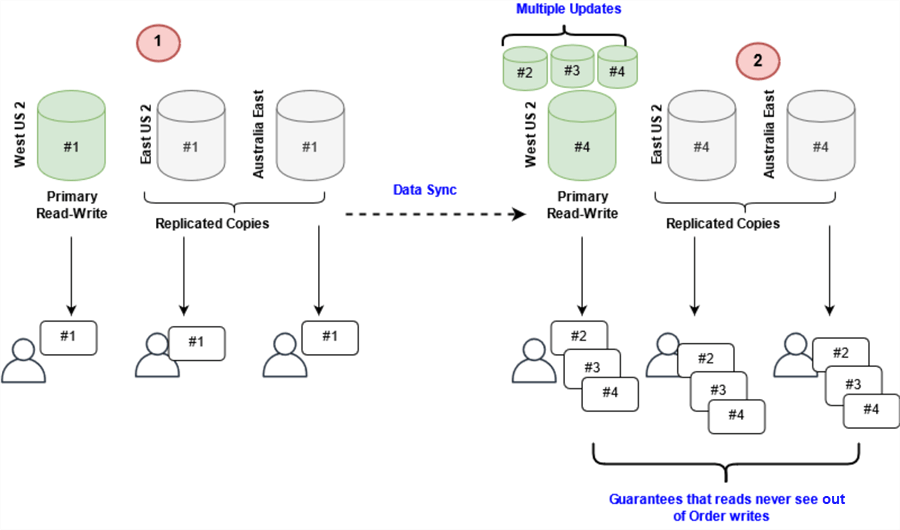
The following screenshot refers to a user performing updates in the sequence of #2, #3, #4. The replicated copies also get data in a similar sequence (#2,#3,#4) so that reads will never be out of order of the writes.

Consistent Prefix

The consistent prefix provides read consistency to a specific point in time, good performance, and high availability. It is suitable for the models that can afford the lag but requires high availability with low latency.

Eventual Consistency

"Eventual consistency is a weak form of consistency where the client might get older records than the ones it had seen before overtime."

The Eventual Consistency does not guarantee the order of the data. It also does not guarantee how long the data can take for replication. As per its name, it offers consistent reads eventually.

The eventual consistency model provides high availability with low latency and the highest throughput.

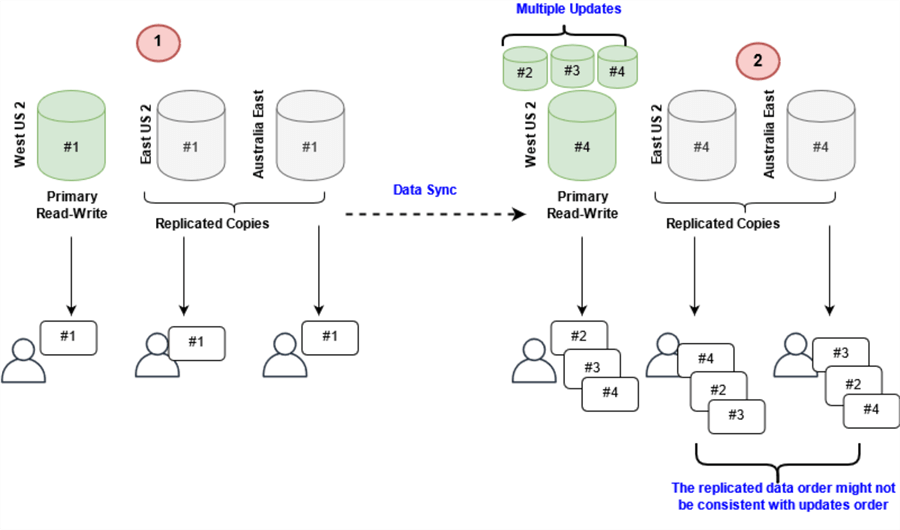
The following screenshot refers to the eventual consistency where the data does not guarantee any order. If a user updates records in sequence of #2,#3,#4, the replicated region might get data in different sequence such as #4,#2,#3 or #3,#2,#4.

Eventual Consistency

It is the weakest consistency model because the client might read values older than they had read before. Therefore, it is suitable for applications that do not require guaranteed ordering. For example, count of retweets, non-threaded comments, likes, etc.

How to set consistency model for Azure Cosmos DB

In the Azure portal, go to your Azure Cosmos account and choose the required consistency model from the option – default consistency model.

Choose the required consistency model and click Save.

How to set consistency model for Azure Cosmos DB


Monday, 21 November 2022

Windows application (Desktop) automation with Winium

 There are lots of different automation tools and frameworks are available for windows applications (mainly for desktop application ) like – Sikuli, AutoIt, CodedUI, Winium etc. I have gone through all of them for desktop application (windows) automation for testing. All of them have different advantages and disadvantages.

Among all of them i found ‘winium’ the most easy and handy automation framework for desktop application . It’s completely my personal opinion.In this post i am going to describe the following things-

1.What is winium

2.Why it is better than other tools (according to me)

3.How to set up the whole environment for using winium

4.Some example

Winium

Winium is an automation framework for windows platform. It is free, opensource and most importantly it is selenium based.

Why Winium: 

  • With winium we can write our test with any language that’s compatible with webdriver such as – Java, Objective-C, JavaScript with Node.js (in promise, callback or generator flavors), PHP, Python, Ruby, C#, Clojure, or Perl with the Selenium WebDriver API and language-specific client libraries.
  • we can use any testing framework with it
  • Supported platforms – Windows Desktop (WPF, WinForms) Apps,Windows Store or Universal Apps for Windows Phone,Windows Phone Silverlight Apps

Here our main focus is winium for desktop

Winium.Desktop is Selenium Remote WebDriver implementation for automated testing of Windows application based on WinFroms and WPF platforms.

Supported Platforms

  • WinForms
  • WPF

Requirements:

  • Microsoft .NET Framework 4.5.1

Steps to setup the environment:

  • First we need to set up .NET Framework 4.5.1 in our system
  • Then go to the following address to download winium.desktop.exe – https://github.com/2gis/Winium.Desktop/releases
  • All other libraries we are going to download through maven, below i am giving my maven dependencies
1
2
3
4
5
6
7
8
9
10
11
12
13
14
15
16
17
18
19
20
21
22
23
24
25
26
27
28
29
30
31
32
33
34
35
36
37
38
39
40
41
42
43
44
45
46
47
48
49
50
51
52
53
54
55
56
57
</pre>
<pre>
    4.0.0
 
    com.autiomation.winium
    com.autiomation.winium
    1.0-SNAPSHOT


                org.apache.maven.plugins
                maven-compiler-plugin
                 
                    1.6
                    1.6


            junit
            junit
            3.8.1
            test


            com.github.2gis.winium
            winium-elements-desktop
            0.2.0-1


            com.github.2gis.winium
            winium-webdriver
            0.1.0-1


            org.testng
            testng
            6.11


            org.apache.poi
            poi-ooxml
            3.15


</pre>
<pre>

To initiate the winium driver

1
2
3
4
5
6
7
8
9
10
11
12
13
14
15
16
17
public WiniumDriver setupEnvironment() throws IOException {
 
    String outlookApplicationPath = "C:\\ProgramfileS|\...\..\outlook.exe";
    String winiumDriverPath = "C:\Progra...\..\winium.desktop.exe";
 
    options = new DesktopOptions(); //Initiate Winium Desktop Options
    options.setApplicationPath(outlookApplicationPath); //Set outlook application path
 
    File drivePath = new File(winiumDriverPath); //Set winium driver path
 
    service = new WiniumDriverService.Builder().usingDriverExecutable(drivePath).usingPort(9999).withVerbose(true).withSilent(false).buildDesktopService();
    service.start(); //Build and Start a Winium Driver service
    driver = new WiniumDriver(service, options); //Start a winium driver
 
    return driver;
 
}

This block of code will create the driver to communicate with our application. Rest of the things are like automating a web application with selenium. We are going to use basic selenium commands like “findElementBy.sendKeys()” or “findElementBy.click()” etc.

Example – adding two number with the calculator application in windows

1
2
3
4
5
6
7
8
9
10
11
12
13
14
15
16
17
18
public void addNumberTest() throws InterruptedException {
 
    Thread.sleep(5000);
    WebElement calcFrame = driver.findElement(By.className("CalcFrame"));
    WebElement menu = driver.findElement(By.id("MenuBar"));
    WebElement viewMenu = menu.findElement(By.name("View"));
    viewMenu.click();
    viewMenu.findElement(By.name("Scientific")).click();
    Thread.sleep(2000);
    calcFrame.findElement(By.id("132")).click();
    Thread.sleep(2000);
    calcFrame.findElement(By.id("93")).click();
    Thread.sleep(2000);
    calcFrame.findElement(By.id("134")).click();
    Thread.sleep(2000);
    calcFrame.findElement(By.id("121")).click();
    Thread.sleep(2000);
}

To find the element properties of a windows application we will use “Inspect.exe” which is available by default in windows if not just download it.It gives all the properties of a desktop application to control it

153493

Winium is much handy tools for automating windows application as it is selenium based. We are very much familiar with selenium based commands so  it is very easy for us to work with winium.And it is pretty fast comparing to other tools i think.

Resource links – https://github.com/2gis/Winium